Use grep -n to print only matching log lines with their original line numbers. Add -C to include surrounding context and -E for regular expressions. If you need to expand context or jump back into the full file, use a viewer that treats the filter as a reversible view instead of a separate text stream.
Filter a log in Terminal with grep
grep -n "ERROR" app.log
grep -n -C 3 "timeout" app.log
-n keeps the original line numbers and -C 3 adds three lines of context around each match - between them, most of what filtering means. Add -E for regular expressions.
The cost is that grep's output is a dead end. It's a new stream, not a view of the file: you can't widen the context around one interesting match, follow the file as it grows, or jump from a matching line back into the full log at that spot. Every refinement is another command and another scroll-back.
Filter a log without losing the original context
In Log Viewer, Filter collapses the file to the matching lines in place. The original line numbers stay, every stretch of hidden lines is drawn as an explicit break - so you always know what was left out - and an optional context setting shows the lines around each match. It's live: refine the query and the view refines, no re-running anything, even on a million-line file. Literal or regex, your choice.
Two things grep can't offer at all: the same file open in several tabs, filtered differently in each - errors in one, one request's ID in another - and Go to Line that reaches a line the filter is hiding rather than the nearest one it isn't.
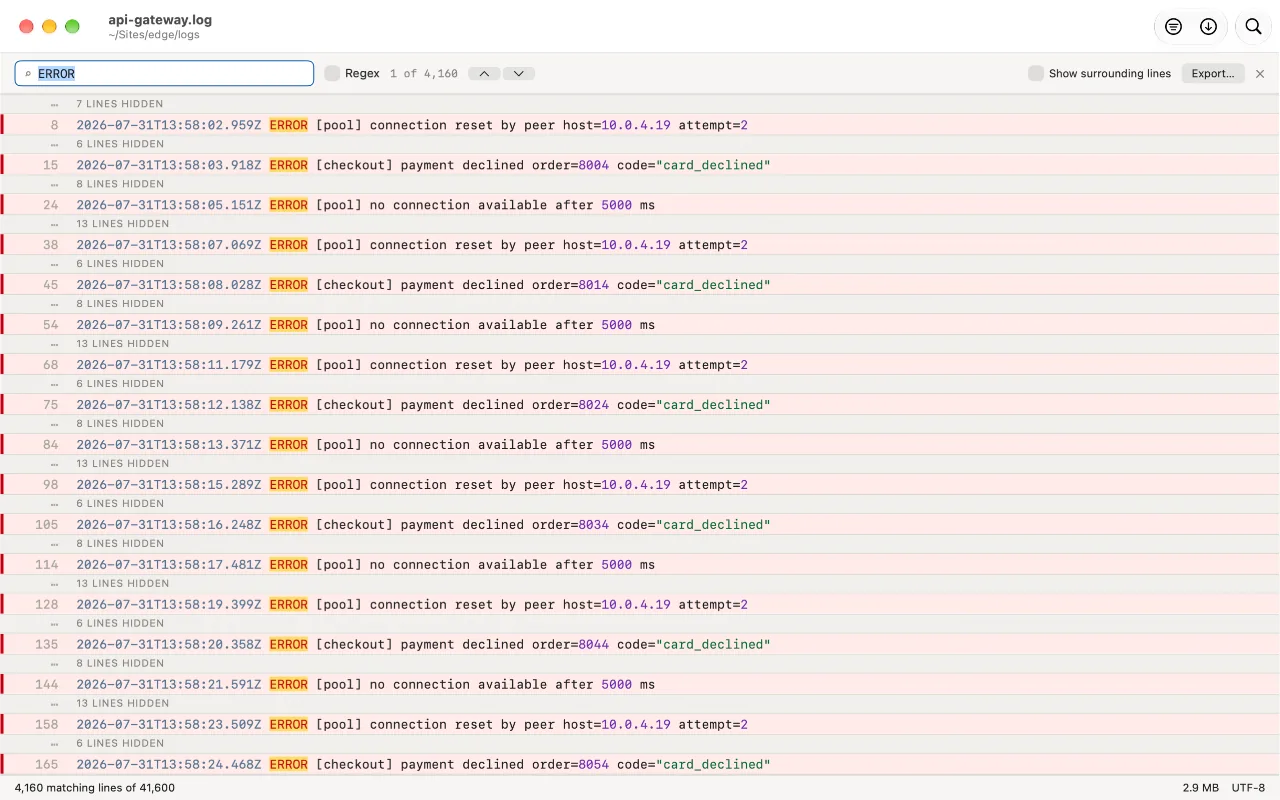
Export the filtered view when you need a file
Once the filter has finished, choose Export to save the current filtered view as a new log file. It contains the matching lines and any surrounding context you chose to show; the original file stays untouched. That gives you a clean extract to attach to an issue or send to someone else without rerunning grep or losing your place in the full log.
Search still exists alongside (Find jumps between matches while the file stays put) - the app's own FAQ puts it plainly: Filter is usually what you actually wanted.
Free on the Mac App Store. No accounts, no network, no size limit from the app.
FAQ
How do I see only the errors in a log file?
In Terminal, grep -n "ERROR" app.log. In Log Viewer, type the pattern in Filter - the file collapses to the matching lines with their real line numbers, and a context setting brings back the lines around each match.
What's the difference between Find and Filter?
Find jumps between matches while the rest of the file stays where it is. Filter collapses the file to the matching lines only, keeping their original line numbers and marking every stretch it hid.
Can I filter the same file two ways at once?
Yes - open it in as many tabs as you like and filter each tab differently.
Can I save only the matching log lines?
Yes. After filtering has finished, choose Export to write the current filtered view to a new file. It includes any shown context and never changes the original log.
