A photo can contain metadata alongside its pixels. EXIF fields commonly record the capture time, device, lens, exposure and GPS location. IPTC and XMP fields can add a caption, creator, copyright, keywords and editing history. Which fields are present depends on the camera, editor and export settings.
GPS coordinates can reveal where you were
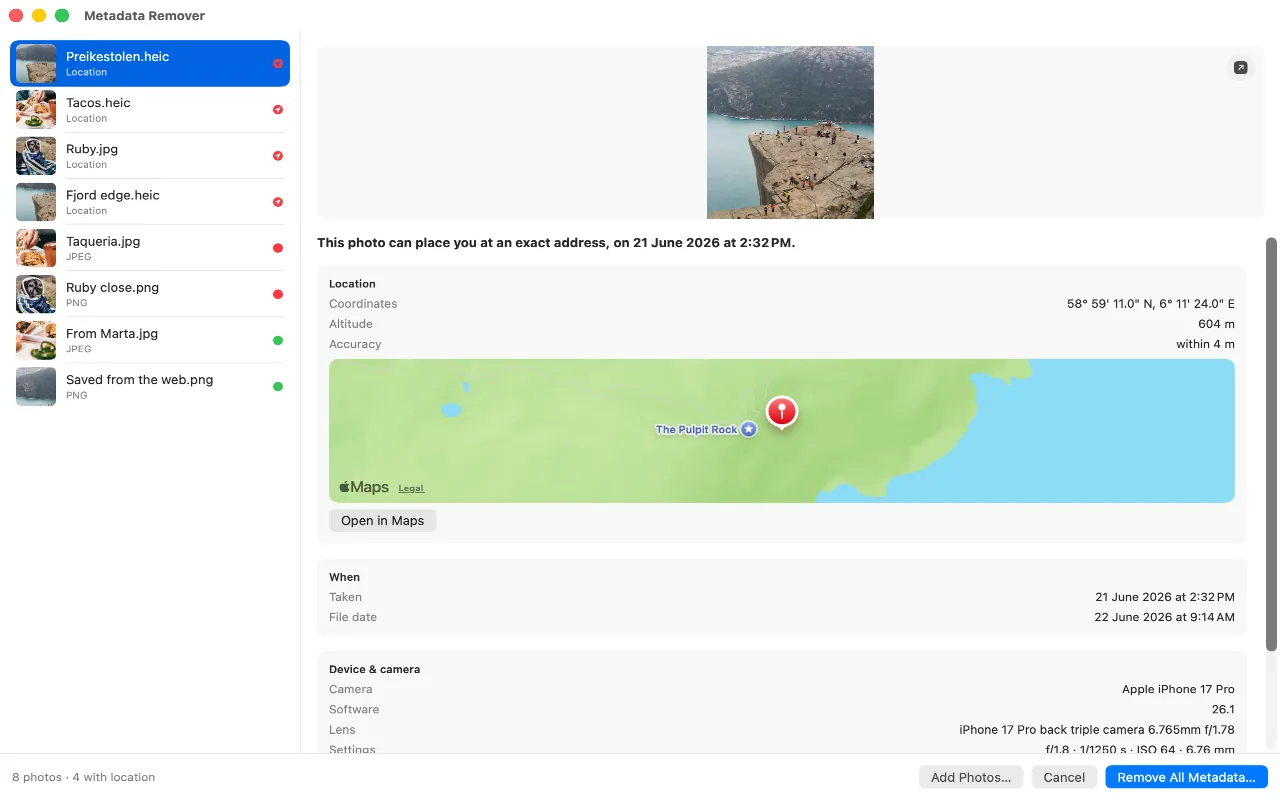
GPS coordinates, usually accurate to a few metres, plus altitude and the accuracy of the fix. That is precise enough to identify a house rather than a street. A photo taken indoors at home and posted publicly is a home address, written in a format most people cannot read but any tool can.
Timestamps can reveal when the photo was taken
The capture time to the second, in two or three separate fields: when the shutter fired, when the file was written, and when the GPS fix was taken. The GPS timestamp is in UTC, which combined with the coordinates gives a timezone, and from there a pattern of where someone is at what hour.
Camera metadata identifies the device and settings
EXIF can record the device make and model, lens, focal length, aperture, shutter speed, ISO and software version. These fields often identify a device model and photographic workflow, but they do not usually identify one physical phone or camera unless the file also contains a serial number or another unique field.
Editing software can add more metadata
Editing software leaves its own trail. Some apps write their name and version, some write an editing history, and some add IPTC fields meant for newsrooms, complete with a byline and a location description in plain words. A photo that has passed through several apps often carries several layers of this.

Can photo metadata contain your name?
A photo taken on an iPhone does not normally include your Apple Account or phone number. However, editing and publishing software can add a creator name, byline, copyright notice, contact details or free-form comments in IPTC and XMP fields. Face-recognition labels from Apple Photos are not normally exported in the image file. Inspect the actual file instead of assuming every photo contains or omits the same fields.
How to view photo metadata on iPhone or Mac
On a Mac, select a photo in Finder and press Command-I, or open it in Preview and choose Tools, then Show Inspector. On an iPhone, open a photo and swipe up, then tap Adjust to see the location. Both show a summary rather than everything the file holds.
Metadata Remover shows all of it in plain language, and removes it without touching the picture. It is free, and nothing you open in it leaves your device.
To see what one particular photo carries, open it in the photo metadata viewer. It reads the file in your browser, shows the location, date and camera, and can save a copy without them.
