
Remove location and EXIF data from photos
See what your photos know, then take it out, with no limits
Every photo you take records where you were, when you were there, and what device took it. This app shows you all of it in plain language, then removes it without re-encoding the picture: same quality, same size, same format. Free with nothing held back: no cap on how many photos you clean, no watermark, no paid tier, and no photo ever leaves your device.
Use the left and right arrow keys to change screenshot.
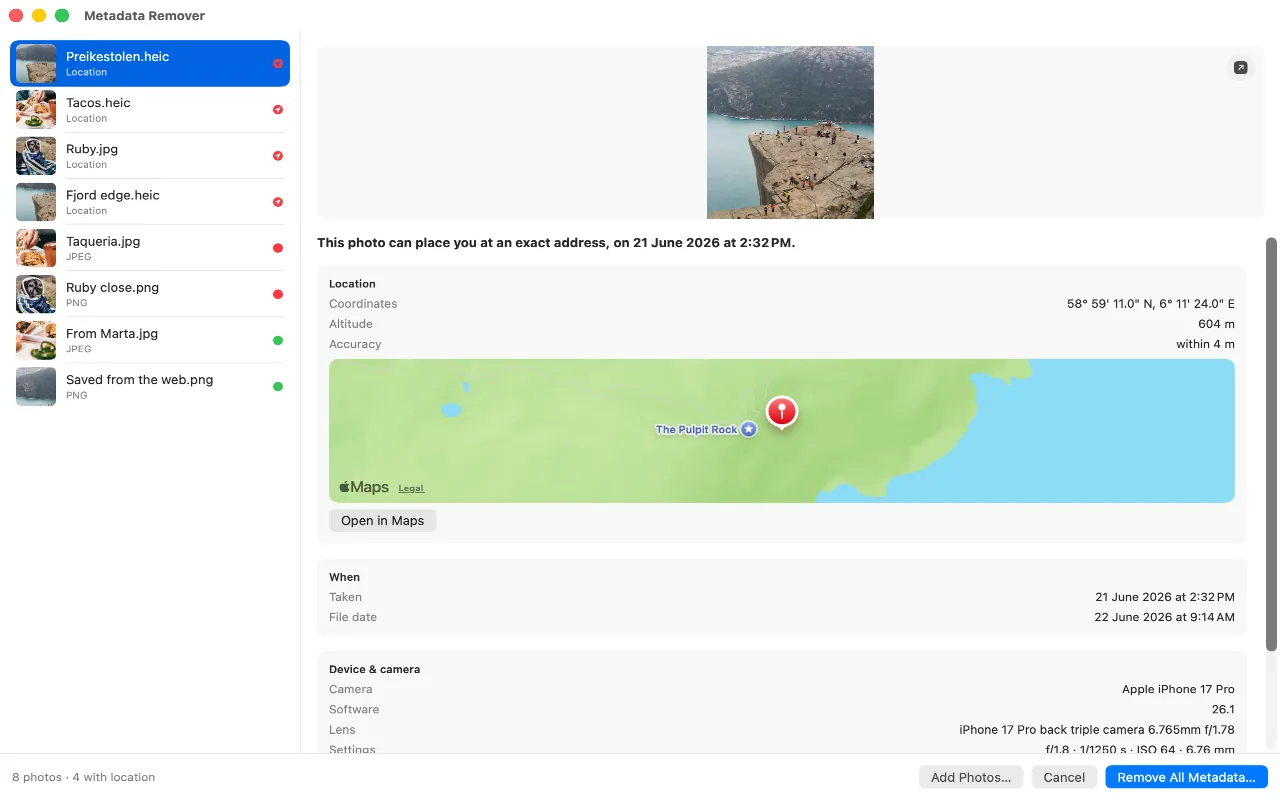
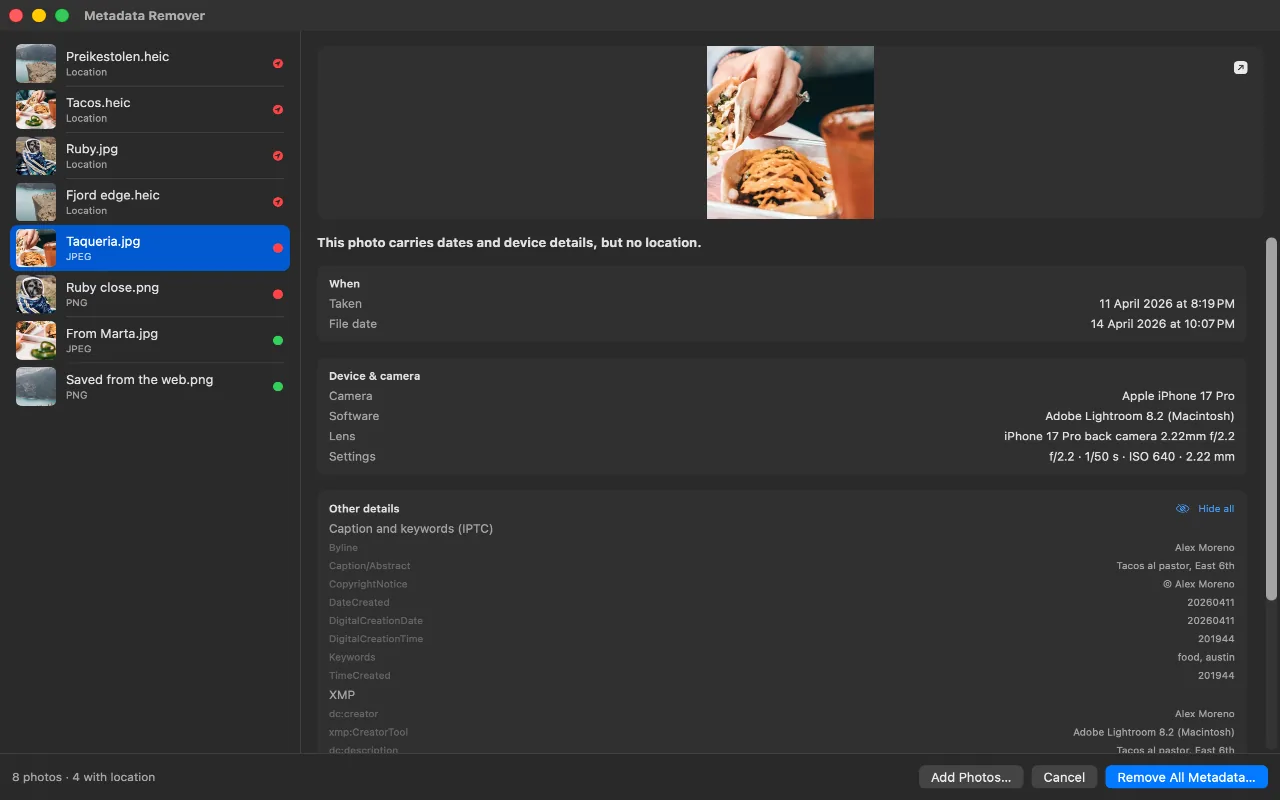

Screenshot 1 of 3: The location and every other detail a photo carries, read straight from the file.
Features
- Lossless, and provably so. The compressed image data in the file it writes is byte for byte the data that went in. Nothing is decoded, so nothing can be re-encoded.
- Nothing behind a paywall. This app has no paid tier, configured batch cap, watermark or locked export. Its cleaning and inspection features are available without a purchase.
Three steps, and the photo looks identical
- 01
Drop in photos
Drag photos onto the window or choose them from Finder. The app only sees the files you hand to it.
- 02
See what is inside it
The location, the exact date and time, the device and lens, the editing history. Written the way a person would say it, not as a table of tag names.
- 03
Remove everything, or just the location
Choose a destination folder for the clean copies. The originals are never modified.
What you get
- JPEG, HEIC, PNG, WebP and TIFF. Including the formats most tools quietly convert to JPEG. The file you get back keeps the format, the codec and the quality of the one you put in.
- All metadata, removed losslessly. Removes EXIF, GPS, IPTC and XMP metadata while preserving the image payload, format, orientation and colour profile.
- Finder and the share sheet. Open files from Finder or clean a photo directly from the Mac share sheet.
- Batches with no limits. Five hundred photos or five thousand, as many times a day as you like. No cap, no queue, no daily allowance, and no paid tier to lift one.
- See the place, not the coordinates. The location a photo carries is drawn on a map, so you see the actual street rather than a pair of numbers. It is the only thing in the app that fetches anything, and one switch in Settings turns it off.
- Photos stay on your device. Reading a photo and cleaning it both happen locally. Nothing is uploaded, there are no accounts, no analytics and no telemetry, and the only network request either app makes is for the map you can switch off.
- Made for the Mac. Drag photos onto the window, read what each one carries, and choose the folder the clean copies go to. The Mac share extension is there when Finder is not.
- Rotation and colour survive. Orientation and the colour profile are deliberately kept, so a cleaned photo displays exactly as the original did: the right way up, in the right colours.
The same app, on your Mac
Drop them in
A folder of photos, read at a glance
Drag photos onto the window and each one is listed with a dot showing what it carries. Select one and everything it holds appears on the right, down to a map of the spot its coordinates point to.
Every field
Nothing you have to take on trust
"13 fields" is a number you would otherwise have to take on faith. Open it and there they are: the caption block a desktop editor left behind, the XMP written by the last app that touched the file, each field with its value beside it.
Where they went
You pick the folder, and it says which one
The clean copies go to a folder you choose, not one the app decided on. The finished screen names it, Reveal in Finder takes you straight there, and the originals are still where they were.
Why "lossless" is the whole point
Most free metadata removers decode the photo and encode it again to write the file back out. That approach is easy to build, and it quietly costs you quality every time. It is also why so many of them hand back a JPEG when you gave them a HEIC, and a larger file than you started with.
This app edits the container instead. Metadata lives in its own blocks alongside the compressed picture, so removing it is a matter of copying everything except those blocks. The picture itself is never touched, the file can only get smaller, and the result is identical to the original in every way except the one you asked for.
Guides
- Remove location from iPhone photosRemove location before sharing, clear it from existing photos, or stop recording it for new ones.
- What photo metadata reveals about youA field-by-field guide to GPS, timestamps, camera details, editing history and creator information.
- How to choose a free metadata removerCheck batch limits, re-encoding, upload requirements, ads and export format before cleaning an album.
- Remove EXIF from HEIC without losing qualityKeep the HEIC image payload and format while removing GPS or broader metadata.
FAQ
Is it really free?
Yes. No ads, no in-app purchases, no subscription, no accounts, no trial, and no feature held back for a paid tier. It is a small tool that does one thing.
What is the limit on how many photos I can clean?
There is no limit. Not per batch, not per day, not per month. Free apps in this category typically stop at five or ten photos and sell you the rest, add a watermark, or show you what a photo carries and then charge to remove it. This app has no paid tier, so there is nothing to gate: a batch simply runs until it finishes, on as many photos as you can select.
Does it work without an internet connection?
Yes, with one optional exception. Reading a photo and cleaning it are entirely local, so the app works with no connection at all. The map showing where a photo was taken is drawn by Apple and needs one; turn it off in Settings and the coordinates and the Open in Maps button still do the same job.
Does it change my original photos?
Never. Every result is a new file, or a new photo in your library. Deleting the original afterwards is a toggle that stays off by default, and it always goes through the system delete confirmation.
Does it work on videos?
No, photos only, and the app says so rather than half-doing it. A video stores its sample data at fixed positions in the file, so removing anything means rebuilding the index that locates every frame, and the result could never be shown to be byte-identical, which is the one promise this app makes. If you need to strip a video, exporting it from the Photos app removes most of its metadata.
Will the file be bigger afterwards?
It cannot be. Nothing is ever added to the file, so a cleaned copy is always the same size as the original or smaller.
Get Metadata Remover
Free, and your photos stop saying where you were.
 (opens in a new tab)
No ads, no purchases, no accounts, no limits · Contact support
Support small, independent apps
If Metadata Remover has been useful to you, you can support more small apps like it.
 Buy me a coffee