Text in a video is part of the picture, so you cannot select it while the video plays. The trick is to pause on the frame first. Since macOS Ventura, Live Text can read a paused frame in Apple's own players, and a screen OCR shortcut covers every other player.
Method 1: pause and use Live Text
- Play the video in QuickTime Player, Safari, Photos or the TV app, and pause on the frame with the text.
- Move the pointer over the text until it becomes a text cursor, then drag across it.
- Control-click the selection and choose Copy, or press Command-C.
This works in Apple's players. In other players, including many video sites in other browsers, conferencing apps and streaming apps, the paused frame is not readable this way. Copied text also comes without any formatting.
Method 2: any player, one shortcut
Screen OCR & Translate reads whatever is on screen, so the player does not matter. Pause the video, press Control-Option-C, and drag across the text. The screen holds still while you drag, so a frame that is only up for a moment is fine as long as it is visible when you press the shortcut. Slides keep their line breaks, so a bulleted list pastes as a list.
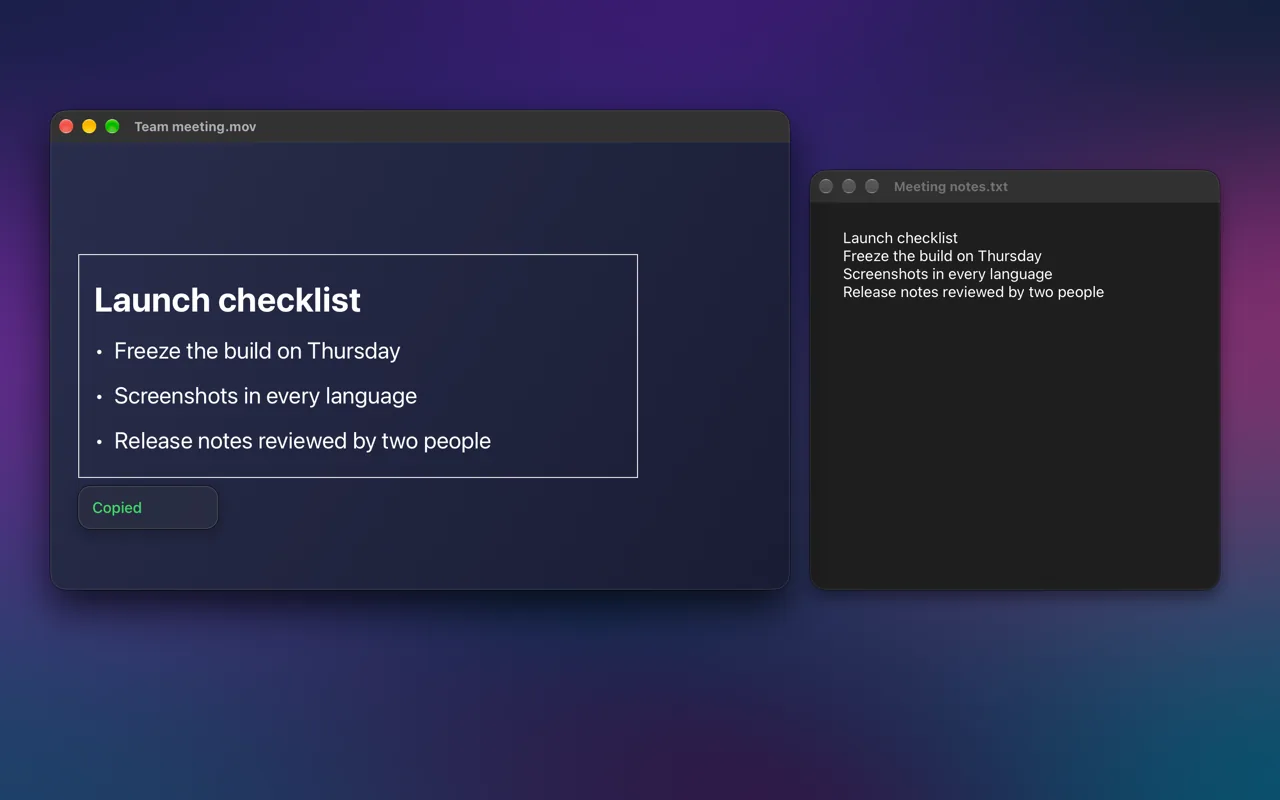
If the text is in another language, Control-Option-D does the same thing but shows a translation instead of copying, in a card right beside the text.
Tips for video text
- Pause on the sharpest frame. Motion blur and compression artifacts are the usual cause of misread letters.
- Make the video bigger, or full screen, before you capture. More pixels per letter means fewer mistakes.
- For subtitles, select just the subtitle lines rather than the whole frame, so stray text in the picture is left out.
FAQ
Can I copy text from a YouTube video?
Pause it and use a screen OCR shortcut, which works in any browser. Live Text on a paused frame works in Safari's own player on some sites, but not everywhere.
Can I copy text from a Zoom or Teams screen share?
Yes, with a screen OCR shortcut: the shared screen is just pixels in a window, which is exactly what it reads. Live Text does not reach inside conferencing apps.
